Tuesday, 22 September 2009

Avoid 5 myths when you DIY a PC


It is time to upgrade my 5 year-old Pentium 4 so I hunt around for good bargain and update my desktop knowledge again.
My budget is S$1000 for a mid-performance desktop. After reading some materials and reviews on DIY desktop, I like to share with you my experiences in avoiding the 5 myths in DIY.

Myth 1 – I must get the fastest processor or CPU

CPU is the brain of the system but the performance of the system depends on the teamwork of all other parts. The main reason why I do not buy branded desktop is because they always cut corners on those parts. The advertisement highlights the latest Intel i7 PC but they gives you only 2GB RAM or a IDE harddisk. If you like to sprint 100m with 10kg of extra weight or you have no idea what you are buying, you will fall into the trap. If you are aware of these bottlenecks, you will upgrade them and in the end, the cost is higher than DIY.
So what is a reasonable CPU speed for today's application for multi-tasking purposes? If you ask me for a DIY budget desktop, AMD Athlon 64 x2 5000+ or a Intel E7200 for good enough for general purposes and light gaming. Any extra is a bonus. Knowing the limitations and restrictions on hardware and software is important in selecting the components to get a balanced system for the money you pay.

Myth 2 – There is only a few branded motherboards, the rest are rubbish.

Motherboard is a critical part of all the components that connects to nearly all components. Many chase after branded motherboard during DIY. Branded motherboards are good due to their strong R&D team, quality and features offered. However, latest features are always implemented in the high-end motherboard so they are not strong in low- or mid-end motherboard in S$120-200 range. Adding to the cost of promotion, marketing and advertising, these low-end or mid-end branded ones lose out to less branded motherboards who positioned their high-end motherboard at the same price range.
Therefore, choose less branded motherboard instead of branded ones if your budget falls below S$200 unless you are going for the latest features.

Myth 3 – I want the highest video ram offered by the video card. The core is not important.

The current video RAM in a video card is usually 128/256MB. Some video manufacturers use a low-end video core but add 512MB ram as gimmick. Many rush to buy them ignoring what core processor it has. The truth is the core processor dictates the power of the video card and the increase in video ram offer <10% in performance. Unless you have a large LCD screen of 32", you need the high video ram for buffering.

Myth 4 – I want 2 video cards for best video performances

NVIDIA has SLI technology while ATI offers CrossFire technology. These technologies are used in overall 3D enhancement but are incompatible with each other. Tests have shown that two video cards can only improve the performance slightly (SLI has 20-30% improvement while Crossfire has 10-20%). With many motherboards with such technologies, many users buy another specific card to complement the on-board video. However, the price of video card has dropped significantly and it is cheaper to buy a dedicated video card instead of using the on-board video.
For example, if you have a 780 motherboard and wish to buy another video card, it is better to invest in a HD4850 instead of a HD3450. You will get 3-4 times the performance at double the price.

Myth 5 – Any accessories are good enough for me as long as they can be used.

Keyboard and mouse are the only contacts to the desktop and they indirectly affect our health and efficiency especially long period of use. The power supply regulates and stabilizes the power and helps you to save your monthly bill if you buy a highly efficient one. A good casing provides noise insulation, heat dissipation and prevents electronic static discharge and dust. It ensures a cool and quiet desktop. All these investments offer a good experience in using a PC in the next few years.

What is my final decision?

Below is my consideration after comparing the prices.
CPU: Athlon II x4 620 + Biostar TA790GX A3+
RAM: Kingston DDR3 1066 2GBx2
HDD: Western Digital 640GB, 32MB

Casing: Cooler Master 341
Power Supply: Andyson G480

DVDR: Samsung DVDRW
Video card: HD4850


Athlon II x4 620 is the new kid on the block. Comparing with Phenom x3 710, both consume 95W but Athlon II x4 620, without L3 cache, has 4 cores instead of 3. 4GB of Kingston RAM is more than enough for WinXP due to its memory restriction by the OS. BioStar TA790GX A3+ is the valued motherboard using 790 chipset with HD3300 build-in video. It supports AMD AM3 processor with support for DDR3 RAM. 640GB offers the best GB/$ ratio now so it is a default. Cooler Master 341 offers easy installation of components and Andyson G480 is 80+ certified. HD4850 offers the best bang for the bucks now if you are into heavy gaming. If the video card breaks down after the warranty expires, I can turn to the built-in HD3300 while I shop for another video card.


This system can also be used when I upgrade to Vista or Windows 7 in the future.

Saturday, 19 September 2009

The ULTIMATE Guide to make your smartphone battery lasts longer

Introduction

A marketing survey reveals that everyone wishes their battery to last for preferably 2 days or more. However, many are disappointed when their new phone fails them when it fails to last for 8 hrs. Why? Indeed, 37% of the responders felt that the lifespan of the mobile phone is too short.

There are websites which spelt out the tips and tricks to conserve your mobile phone battery. Unfortunately, they are only covering major aspects of the topics and give general tips. So far, none of the website provides a complete guide on the determining factors and squeeze battery till the last watt. I will try to fulfill this role here.

Selecting a phone that suits your lifestyle

All 3G phones have Bluetooth and GPRS. Certain models have Wifi, GPS or Email client which may deplete the battery faster. The size of the screen is another crucial factor of the battery life. 3.5G promises HSPDA which speed up the download speed of phone. With a data plan, 3.5G phone is the best buy for the bucks. With many applications installed in the phone, the battery life becomes the most important factor before you grab it.

When you select a phone, you must check if the phone is powered by an adequate battery. Based on the manufacturer's specification, it is good to estimate the estimate real lifetime of the phone at use. I shall term it the REAL BATTERY LIFE (RBL). RBL of a mobile phone (hrs) is defined as the multiplication of the standby time found in the specification and the RBL percentage. RBL percentage is derived from the average battery life of mobile phone in real life as spelt out below:

RBL Percentage

2G

3G without data plan

3.5G with data plan

Light user

40%

20%

20%

Moderate user

25%

15%

10%

Heavy user

15%

10%

5%


For example, if you are buying a 3.5G smartphone with 300 hrs standby time, the phone will last 60 hrs for a light user but only 6 hrs for a heavy user. Therefore, it is unwise to buy LG KS500 if you are a heavy user unless you have access to a charging facility.

Therefore, you need to perform a match of your lifestyle with the RBL. Failing to perform this check may cost you dearly in buying an expensive phone that cannot keep up with your busy lifestyle. RBL is valuable more to a heavy user than a light user. Currently, Philip Xenium X500 offers up to 3600 hrs of standby time based on a 1720mAh battery. However, it is a simple 2G phone with no GPS, 3G and wifi features. If you are using purely voice call and SMS, you may like to consider buying Xenium X500 instead of a smartphone since it is tailored for your lifestyle.

Battery Maintenance

To prolong a battery life, you need to understand your battery. A lithium battery lasts for 500 charges so it is advisable to change your battery after every 2-3 years. It will permanently lose ~20% of its rated mAh after 400 charges. Although there is no memory effect for lithium battery, it is unwise to fully discharge unless the phone is not displaying the correct amount of energy. It is also unwise to charge your phone when you still have more than 50% battery life else you will use up the number of recharge. Therefore, charge your phone when the battery shows 1-2 bar.

If you have a spare battery, you need to use and charge it regularly because it will deteriorate if they are not in use. Having said that it is not advisable to get 2 batteries, why not get the best battery for the phone? For Motorola Q 9h, the standard battery is Li-Ion 1170 mAh. If there is a trade-off to get a 1300 mAh which is also supported by the phone, you have an improved battery.

Maintenance is also important to prevent the battery from exposing to extreme heat or overcharge for too long. These damages may be permanent on the battery lifetime. If it is too hot, battery may be malfunction. Therefore, it is unwise to charge them every day or exposing them to moisture environment. Insist on buying an original battery is also important to prevent circuit damage caused by the clone battery during charging.

Tips for the mobile phone

These are the usual tips recommended by reviews and popular websites:

  1. Turn off your Bluetooth, GPS, Wifi and 3G after use;
  2. Lower screen brightness and time;
  3. Select a black or dark coloured theme;
  4. Remove screensavers and animated wallpapers;
  5. Switch off the phone when not in use;
  6. Disable the number of applications in the phone especially the battery consuming ones;
  7. Turn off the vibrating mode, keypad tones or ringtones;
  8. Use a longer polling time for your mails;
  9. Use less radio, camera, browsing, speaker and games and switch them off after using;
  10. Switch to GSM mode instead of using 3G or 3.5G network. This is important for users who talk very often and sending a SMS does not require 3G at all;
  11. Lower the volume of your speaker;
  12. Avoid installing redundant or repeated applications with the same functions;
  13. Update to the latest firmware with fixes on bugs; and
  14. Install your critical programs into your phone memory instead of external memory cards. Remove your external card if possible to stop frequent access.

Even if you are not using any of the functions and switch your phone to offline mode, the real life idle time is still a fraction of the standby time provided by the specifications.

Signal Strengths

Depending on your location, signal strengths from base stations varies. If the phone is struggling to lock on to a network, it will use more power. It happens when places have weak signals, no signal or when you are underground. If you stay in these places for a prolong time period, it is advisable to switch the phone off since it has only 1 or 2 bar of signal strength. When you are moving and using the phone concurrently, moving from cell to cell requires the phone to negotiate between stations so it uses more power when you are mobile.

Useful S60 applications related to the battery

For Symbian smartphones, there are a few gems to have.

  1. Nokia Energy Profiler or NEP (free) – provides a comprehensive result on the power consumption, current, voltage, CPU, signal strength, data traffic and estimated hour of idling time
  2. Ravensoft Battery Extender – employs a few profiles to optimize the battery
  3. Capree's iON Battery Timer – estimates the remaining time of the battery before it is flat
  4. Alie Tan's ActiveFile – removes tasks which hoard power
  5. Dr Jukka's Profile Scheduler (free) – switches to offline mode while not in use (flight or meeting)
  6. Plan Task (free, www.opda.net.cn) – switches off and on the phone at specified timings (sleeping)
  7. Mobisophy Technology's Interactive Voice Call Master – provides answering machine facility to save call out for voice mails when you have missed calls
  8. Cclock (free) – enables the power saving mode with no screensaver.

Debugging the culprit

After you have applied the tips, your smartphone still cannot last for 12 hours, there must be something wrong with the phone, battery or software. If the battery depletes too fast or gets too hot while on use, it may be faulty and a change is necessary. If you have upgraded to the latest firmware and the problem persists, it is likely due to the applications running in the smartphone. Below is the debugging process.


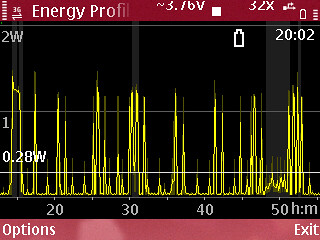
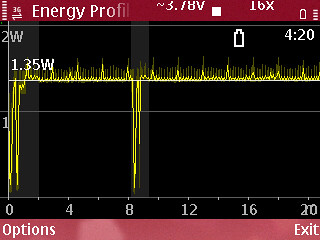
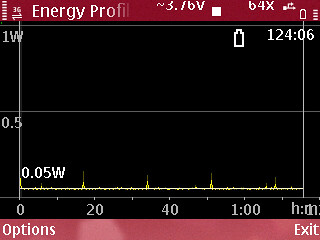
For instance, my battery lasts run 20 hrs running applications with an average watt of 0.28W (Graph 1). If there is incoming or outgoing calls, the power consumption is higher driving battery life to only to 4:20 hrs of talktime based on 1.35W (Graph 2).


  1. Switch off all unused functions in the phone (Bluetooth, GPS, Wifi etc)
  2. Switch off all applications (Push mail, Battery monitoring softwares etc) except ActiveFile and NEP
  3. Run ActiveFile first and take note of all the tasks running in the background (around 20).
  4. Start NEP recording for 20-30 minutes.
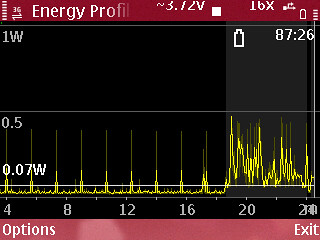
  5. Stop NEP and spikes are observed at 1.5 min intervals (Graph 3)
  6. Spikes recorded during the process imply that some applications are running in the background.
  7. List down the tasks. Some of the safe and common tasks are listed below. They are the safe list.
    1. DevEncstarter
    2. ActiveFile
    3. Anykey
    4. vcommandmanager
    5. Autolock
    6. SysAp
    7. aknnfysrv
    8. screensaver
    9. Telephone
    10. HomeScreen
    11. akncapserver
    12. essysapp
    13. LedController
  8. Identify the unknown tasks and eliminate one task at a time (with application manager) and observe the graph in the NEP over 20-30 minutes
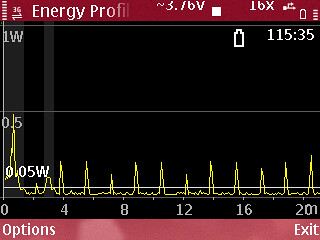
  9. Take note of the deleted task which produces lower current and lower average power. If there is no change, repeat step (8) again and remove another task. (Graph 4 and 5)


  10. Uninstall the identified task with the application manager.
  11. Reboot the device and repeat step (1) to step (10) until graphs show that the current is 4-5 mA, CPU utilization at 1% and average power is 0.02W (Graph 6).

    At 0.02W with no spikes, the idle standby time is recorded as 273.22 hrs which is the best lifetime of the battery. It is still far from the specifications of 20 days or 480 hrs.
  12. You have eliminated the resident programs which cause the high current consumption.
  13. Now, reboot your phone and you should get an optimal battery life running all essential applications based on your lifestyle.

  14. Below is the table for the standard 1500 mAh battery and the number of days the battery can last:

    Average Watt - Number of day
    0.250W - 1 day
    0.125W - 2 days
    0.0833W - 3 days
    0.0625W - 4 days

    So, if NEP shows that the average watt is 0.23, your phone will last slightly more than 1 day.

Conclusion

After running the exercise, your smartphone is performing at its peak with the best battery consumption. If it is still not satisfactory, I conclude either you buy the wrong phone, you like to torture the phone or your dream phone has not been produced yet.

Friday, 14 August 2009

Completely Free GPS navigation in China

Have you been to China and feel lost? Or the cabby is driving you round and round to make more money from your pocket?

Now, you can have GPS navigation FREE OF CHARGE to track your location and find the nearest restaurant or hotel. How about GPRS data charges? No worry, the best part of this tutorial is you don't even have to pay GPRS traffic. So what do you need?

You simply need the following:

  1. A mobile phone with a GPS hardware (not a-GPS) running S60 3rd or WM 5.0 or 6.0;
  2. Your SIM card that can work in China to start up the phone (no roaming required);
  3. Fully charged battery to navigate longer; and
  4. Yourself in China.

Yes. That's all you need but you must equip your phone with an application and map. Follow the steps below:

  1. Download the application (version 4.0 Beta) here to suit your phone from mapabc.com. Choose either Symbian S60 3rd or Windows Mobile 5.0 or 6.0 edition.
  2. Install the application (1-2MB) into your mobile phone. Note: A SMS will be sent out to register the software.
  3. Choose and download the specific map(s) where you will be visiting from HERE and the LARGE SCALE MAP of china. If you still need help in installation, please visit HERE (in Chinese).
  4. Unzip and copy the maps into the memory card of your phone into the specific folder.
  5. Run the application and you can now set your routes before you trip.
  6. When you are in China, enable your GPS in your mobile phone and run the application to lock on your position.

What are the features of this software?

  1. Determine your location;
  2. Locate places of interests like hotels, restaurants, ATMs, shopping centres, banks, parks, car rentals, hospital, clinics etc;
  3. Obtain descriptions of the places of interests like telephone and detail address;
  4. Navigate your route via walking, driving and public transport;
  5. Weather forecast in cities (with GPRS charges);
  6. Public transport, train and air flight enquiry (with GPRS charges); and
  7. Real time traffic status (with GPRS charges).

With all these information, you will enjoy your trip better and save time and resources hunting for your destinations.

Wednesday, 12 August 2009

Which GPS software for my mobile phone?

Global Positioning System (GPS) is taking by storm into virtually all new mobile phones. New users may fully pay for their phone but unaware that their new mobile phone has a-GPS or GPS support. Simply, it is a case of ignorance or the constant fear of being charged extra for data traffic. I summarize the differences between GPS and a-GPS in below table.

GPS

A-GPS

Comments

Sample Phone

YES

YES

a-GPS can speed up and lock the location faster (Eg. 5 sec). If a-GPS is disabled, locking the position may take up to 5 mins.

Nokia N97

YES

NO

Older model like N95 need firmware upgrade to include the software a-GPS.

Older Nokia N95

NO

YES

a-GPS requires GPRS traffic and maybe costly

Nokia N81

NO

NO

GPS software is needed

Your old Nokia phone


When they realized that GPS is actually FREE OF CHARGE (FOC) and bear no data traffic, they will start hunting for GPS application suitable for their phone. The common GPS applications are listed below in alphabetical order.

Vendor

Program

Navigation

Data Traffic

Maps

POIs

Guide

Agis NAVFone

$

Free

Optional

$

Yes

Yes

AmAzeGPS

Free

Free

Yes

Free*

No

NA

Garmin Mobile XT

$

Free

Optional

Free

Yes

NA

Google Maps

Free

NA

Yes

Free*

No

NA

Mapking

$

Free

Optional

Free#

Yes

Yes

Nokia Maps

Free

$

Optional

Free

NA

$

Route66

$

Free

Optional

$

No

NA

TomTom NAVIGATOR

$

Free

Optional

$

NA

NA


* - Free maps with BBOM

# - Free maps with S'pore Land Authority

  1. Agis NAVFone

    This is a local company which can provide unique yellow pages search and public transport route planner. Both program and maps are chargeable but local support is present. It is also the first company to launch postal code search.

  2. AmAzeGPS

    The installation is swift. However, data traffic charges for map download maybe costly because it constantly download the map as you move. You can use tulip navigation to reduce the data charges and generally costs S$0.20 for a city navigation.

  3. Garmin Mobile XT

    The selling point for this program is map can be downloaded from a 3rd party (malfreemaps.com) where the map for Singapore and Malaysia is updated nearly every week. However, it beeps to warn but regretfully, cannot verbally tell you that there is a speed camera ahead!

  4. Google Maps

    Everything is essentially free if you have broadband on mobile (bbom). It has 2 shortcomings. The first being no POIs customized for Singapore and the second being no real-time navigation.

  5. MapKing

    Mapking claimed to be the number 1 seller in Singapore for GPS products with free download of map from malsingmaps.com (free version updated every quarter). The best selling point is the virtual reality look of the map that make the interface realistic.

  6. Nokia Maps

    Both real-time navigation and guides are chargeable. It is ideal for casual users like tourists. Download of worldwide maps is available which is helpful if you are visiting other countries.

  7. Route66

    Both program and maps are chargeable making it less popular in Singapore. Its market segment is mainly in mainland China and USA.

  8. TomTom Navigator

    Tomtom is strong in Europe and USA but less popular in Asia.

So which GPS application should I choose?

  1. FOR FREQUENT USERS IN SINGAPORE

    Being a frequent user, it is wise to invest in a good software for navigation purposes. My clear choice is Garmin Mobile XT with frequent updated map and Point-of-Interests (POIs). For those with bbom but unwilling to buy the program, you can settle for AmAzeGPS for direction navigation. Else, Google map or Nokia map are good enough for simple location tracking.

  2. FOR FREQUENT USERS IN MALAYSIA

    For those who often drive into Malaysia for good food and cheap petrol, it is wise to equip with professional GPS device for driving navigation instead of depending on your small screen mobile device. You can explore more areas with ease and discover and share more good food locations via forum discussions. You enjoy faster speed in navigation, clearer graphic for viewing and better voice and power integration with your car. Some popular brands are Holux, TiBO and Garmin.

  3. FOR CASUAL USERS

    If you are planning a trip to overseas, it is good to bring along your mobile with GPS and download the latest Nokia map. With the battery fully charged, you can be assured that you will not be lost in the Wonderland.


Thursday, 23 July 2009

How to test the data speed of your mobile phone?

From the earlier posts, we consider both the mobile phone and the data plan for mobile broadband plan.

Now, how do you know the speed of your data transfer of your mobile phone? Does it matter?

Of course, there are many factors that affect the transfer speed. If the transfer speed is slow, then you have failed to select a good mobile phone or you have signed a rip-off data plan. So what are the factors?

  1. Mobile Phone
    1. Can your mobile phone support high speed transfer? I hope you get the right phone from earlier post.
    2. What browser are you using? Different browsers may affect the transfer speed due to their efficiencies.
    3. Are you running too many applications while running the test? I would suggest you to close all applications before running the test.
    4. What test sites are involved? Read on…
  2. Data plan
    1. What is the promised maximum download speed? Higher speed means higher price but do you really need the extra mileage?
    2. What is the promised maximum upload speed? This speed is usually slower than the download speed and most of the telcos match their competition.
    3. How much are you paying monthly? You have to make sure every penny you pay delivers the promised speed.
  3. Environment
    1. Are you testing in peak hours?
    2. Are you getting a 3G or 3.5G network?

Before we can answer the above, let's run the tests on these 2 websites from your mobile phone.

  1. DSL Report - mspeed (http://dslreports.com/mspeed)

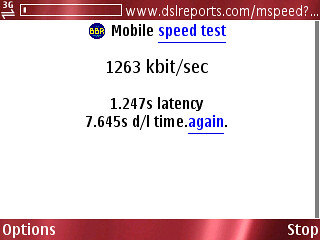
    The user interface is simple and you can start selecting 100k to run the test. You should get this result: "unstable/too fast a result (0.324s) please choose a larger file ". You will keep trying until you select "1MB" because the smaller files are too fast to show any latency during transfer. Eventually, you should get messages like below showing the kbps, Latency/Sz, Domain (if any) and the User agent (browser):

    "875 0.191s (1024k)
    elisa-mobile.fiHTC_Touch_Pro_T7272 Opera/9.50 (Windows NT 5.1; U; en)" or

    "664 0.393s (1024k)
    tmodns.netMozilla/5.0 (Linux; U; Android 1.5; en-us; HTC Hero Build/CUPCAKE) AppleWebKit/528.5+ (KHTML, like Gecko) Version/3.1.2 Mobile Safari/525.20.1"

    Using the same file size (1024k), we can see that HTC Touch Pro (875kbps) has a faster transfer speed than Android (664kbps).

    You may need to run the test a few times to get an average. Make sure the network is consistent at 3G or 3.5G during your tests else the results may differ.

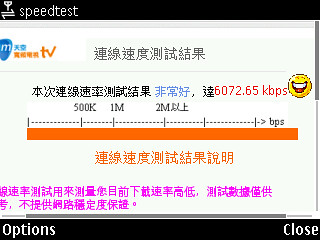
  2. Webs-TV (http://speedtest.webs-tv.net) (in Chinese recommended by OCworkbench.com)

    This website is straight forward. Once you enter the web address, it will start to run and generate a report. If the smiley face is smiling, you are in business.


    Else, consider changing this plan when the contract expires. The speed is written in red located on the left of the smiley face.


I hope you can try out these 2 test sites and post your results here. Your results will help others in selecting the best valued mobile broadband from telco.


Friday, 10 July 2009

Which mobile phone should I buy for mobile broadband?

Many have bought a brand new latest expensive mobile phone but never fully utilize its functions. Ask yourself, if you are just using it for voice communication, then a S$60 phone is good enough for you. You do not need camera function, radio function, 8GB memory card and HSCSD support... not to mention mbb plan. Instead, you should look at size, weight, appearances, large keypad, battery life, big characters for easy viewing and durability.

However, manufacturers are packing tons of features into the phone to make it the best selling models. To best utilize mobile broadband (mbb) plan, there are some fixed and variable factors to consider and I list them for your considerations.

Fixed factors - Must have for mbb plan

  • 3.5G support – There are many standards of data transfer. We are concerned on the maximum speed as listed below:

Technology

Generation

Theoretical speed (Mbps)

Practical speed (Mbps)

GMS

2G

0.0144

0.002

GPRS

2G

0.1140

0.056

EDGE

3G

1.0000

0.300

HSDPA

3.5G

7.2000

2.500


For mbb plan, this is the critical criteria of selection – HSDPA. Forget about GPRS and EDGE which are older technologies and cannot be utilizing the full bandwidth of the mbb plan. Visit GSM Arena for the list of mobile phone with HSDPA. Please note that the practical speed maybe even slower than stated due to network traffic. Therefore, it is pointless to select a mobile phone without HSDPA support. It just cannot make the mark.

For example, why Nokia E71 and not Nokia E63? Both have identical outlook. The former is HSDPA (3.6Mbps) while the later is UMTS (0.384Mbps)…nearly 10 times speed difference. So E63 is a bad choice and that's why it is selling cheap or given away free.


  • Long battery life – Running applications can be torturing for the battery. Without a long lasting battery, you have to run to charge it every now and then. I would recommend a battery with stand-by time of minimum 300 hours for 3G.

  • Reasonable large screen – We prefer to have the largest screen size so the words are bigger for viewing. However, the larger the screen, the more power consumed. It is best to balance battery and screen size after comparing the specifications.

  • Good Operating System (OS) – There are a handful of OS in the market dominating by few players. A good OS will minimize hanging issue that disrupts routine use of mobile phone.

Deciding factors – Deciding applications

Deciding factors are the 2nd most important key in selecting your mobile phone for mbb. The more features you have, the more applications you can run with your mbb. Therefore, it is important to select as many factors as possible from the list below.

  1. Wifi – VOIP calls and local connection thereby saving battery life
  2. Global Positioning System (GPS) – Location based service
  3. Internet Radio – Use of internet radio can save some battery life over conventional radio using antenna
  4. Communication services – Support of emails, RSS, messaging services
  5. Web browser – Use for browsing the web
  6. Games – for leisure and in between work/study.

Optional factors – Desirable and good-to-have

Though are optional, they make the phone fun and complete.

  1. Bluetooth – for transfer between phones
  2. Video Camera – for video call
  3. Memory card slot – for data storage
  4. USB connection – for data transfer

Soft factors – personal preferences

  1. Size and weight
  2. Form factor (bar, flip, swivel or slide)
  3. Colour
  4. Touchscreen/QWERTY
  5. MP3 ringtone

Lastly, I feel these features are of little significances – camera flash (drain battery life), infrared port (replace with Bluetooth), WAP (replace with standard html).

Generating the list

Apart of the clone and doubtful quality china-made phones, I run a list of my criteria above from HERE and below are the results:

Screening

Nokia

Sony Ericsson

HTC

Samsung

LG

O2

Apple

BlackBerry

Total

Fixed

20

34

15

27

7

4

2

1

110

Deciding

13

6

15

9

1

3

2

1

50


Namely,

Nokia: 5730 XpressMusic, 5800 XpressMusic, 6260 Slide, 6710 Navigator, E55, E71, E72, E90, N78, N79, N85, N86, N97

Sony Ericsson: Aino, C905, G705, W715, W995, XPERIA X1

HTC: Advantage X7500, Advantage X7510, Dream, Hero, Magic, P6500, S740, Touch Cruise, Touch Cruise 09, Touch Diamond2, Touch 3G, Touch HD, Touch Pro, Touch Pro2, TyTN II

Samsung: G810, i550, i7110, i780, i8510 INNOV8, i8910 Omnia HD, i900 Omnia, i907 Epix, S8000 Jet

LG: KM900 Arena

O2: XDA Orbit II, XDA Serra, XDA Stellar

Apple: iPhone 3G, iPhone 3GS

BlueBerry: Bold 9000

From the above table, we can see that manufacturers made mobile phones but compromise on key features such as GPS and Wifi capabilities. Only 45.5% of the phones are qualified for our next round of review. A total of 50 mobiles phones qualified for mbb plan. Note that some of these may not be available in Singapore.

Narrowing the choices

The key to find the right phone likes in how much you are willing to pay for it. Older models are cheaper when new models are launched in the market. Out of these 50 sets, 4 are new models (Nokia E72, E55, 6710 Navigator and SE Aino) which have yet to be launched.

After considering the optional and soft factors, you will zoom in to a handful of models. For instance, if you further set below criteria:

  1. Standby time - 400 hrs
  2. With radio
  3. Minimum 2.2 inch touchscreen
  4. Form factor - slide

The final choices are Nokia N97, SE XPERIA X1, HTC Touch Pro or O2 XDA Serra. Happy shopping!

Wednesday, 8 July 2009

Singapore’s BEST 3.5G broadband for mobile phone Plan (Jul 09)

Time flies and prices just got cheaper and we are talking about 3.5G plan with more 3.5G phones readily available in the market.

Again, the conditions for comparison must be stated before we proceed further:

  1. We aim to identify the BEST VALUE plan - broadband for mobile phone (not mobile device or notebook).
  2. Monthly data transfer is UNLIMITED. Those plan not included in this review are purely rip off plans to slaughter so-called causal or low-end users.
  3. Typical broadband mobile access speed of 3G and 3.5G phone are limited to 384 kbps and 3 Mbps (max) respectively.
  4. The minimum download speed is fixed at 2Mbps to optimize the capability of 3.5G mobile phone.
  5. Plan must support data and voice in the SAME sim card.
  6. We are focusing on ONE (1) SIM card for voice and data to explore the full functionalities of 3G/3.5G mobile phone.

Someone mentioned that my table is too complicated to compare. So I have broken them into stages for your easy viewing.


STAGE 1 - 100 minutes free incoming plans

Let's look at what is available for mobile broadband + voice (both data and voice) for 100min free incoming plan. This target segment consists of low-end voice users.

Telco

Singtel

Starhub

M1

Singtel

100min plan

iOne Plus

Powervalue 100

Sun Saver

3G Flexilite

Free minutes

100

100

100

100

Basic charge

25.68

25.68

25.68

39.00

Unlimited data plan

37.00#

38.72

27.10

500MB^

100 min

62.68

64.40

52.78

39.00

150 min

70.46*

72.43

60.81

46.78

200 min

78.23*

80.45

68.83

54.55


*Singtel charges excess minute at S$0.204 (peak) and S$0.107 (off peak). For simplicity, we take the average at S$0.1555.

#Singtel offers 50GB limit for mobile bb plan. We presume there will not be any excess usage above the limit.

^This new plan is included for comparison but 500MB can easily be exceeded in view of the heavy traffic that the current applications are running.

On first look, there seems to be a conspiracy between the 3 telcos offering similar plan at the magic number of S$25.68. However, due to the cheaper mobile broadband (bb) rate offered, M1 becomes the best plan in our first stage selection for unlimited data use.


STAGE 2 – 300 minutes free incoming plans

For the mid-end users for voice, we compare more plans offered by the telcos.

Telco

Singtel

Starhub

M1

300min plan

iTwo Plus

Powervalue 300

Sun Saver Plus

Basic charge

48.15

48.15

48.15

Unlimited data plan

37.00#

38.72

27.10

300 min

85.15

86.87

75.25

500 min

116.25*

118.97

107.35

700 min

147.35*

151.07

139.45


#Singtel offers 50GB limit for mobile bb plan. We presume there will not be any excess usage above the limit.

Again, M1 offers the BEST value plan for Stage 2. For high-end users, you can see that it is also M1 who offered the best since it has the lowest mobile bb charges.

STAGE 3 – Other mobile broadband plans

Singtel has introduced new new plans to capture bb market. But are they worth the money? Definitely not, the plans launched are not competitive with M1 V2Mbps plan.

Telco

Singtel

Singtel

Singtel

M1

Plans

3G Flexi

3G Flexi Plus

Plus

V2Mbps

Free minutes

200

500

300

0

Basic charge

48.15

95.00

48.15

27.10

Data limit

50 GB

50 GB

1GB

Unlimited

100 min

35.10

200 min

56

43.10

300 min

70.10

62.08

51.10

500 min

101.20*

95.00*

93.18*

67.10

700 min

132.30*

188.30*

124.28*

83.10


STAGE 4 – Evaluation

In this evaluation stage, we take the best plans from the above and combine them into this table. They are all benchmarked against only 1 plan (M1 V2Mbps).

Free minutes

Telco

Plan

Data (GB)

Charges (S$)

Saving over the 2nd best plan

100

M1

Sun Saver

Unlimited

52.78

Singtel

3G FlexiLite

0.5

39.00

M1

V2Mbps

Unlimited

35.10

50.37%

200

Singtel

3G Flexi

50

56

M1

V2Mbps

Unlimited

43.10

29.93%

300

M1

Sun Saver Plus

Unlimited

75.25

M1

V2Mbps

Unlimited

51.10

47.26%

500

Singtel

3G Flexi Plus

50

95.00

M1

V2Mbps

Unlimited

67.10

41.58%

700

Singtel

iTwo Plus

1

96.86

M1

V2Mbps

Unlimited

83.10

16.56%


It is no surprise that M1 V2Mbps stands out as the clear winner in all categories from 100 to 700 min free incoming calls. Where is STARHUB in the final comparisons? No idea. They are totally not in the bb league.

STAGE 4 – Conclusions

Since M1 V2 plan beats all categories, is there any catch? Yes, there are. We list them below for your reference and consideration:

  1. Why we are not including V4Mbps or V7.2Mbps? The answer is obvious. Most of the 3.5G mobile phones have a maximum download speed of only 3.6Mbps. So V2Mbps is the optimal plan in this selection.
  2. SMS uses are not factored into our discussion. My question to you is - Why use SMS when you have MSN?
  3. M1 V2 plan is a per minute billing and not per second billing.
  4. There is no discount on 3.5G mobile phone as compared to regular sign-up for new mobile plan. A brand new 3.5G mobile phone may cost S$450 - S$1300. Do not get a 3G phone for mobile bb plan because the maximum download speed is limited to 0.384Mbps (for example Nokia E63).

Despite its shortcomings, we still consider M1 V2Mbps plan to be the BEST valued 3.5G mobile bb plan for a 3.5G mobile phone. So after selecting the plan, what 3.5G phone should be purchased and what are the applications to tap the full capabilities of the bb plan? We shall discuss next time.

References

Featured Post

BlueSG vs CarShare

BlueSG vs CarShare Since 12 Dec 2017, the first electric car rental has started business in Singapore and there is no need to pay for petr...